Guides
How to turn a changelog into an X thread
A changelog is already what you shipped. Shape it into a hook, one change per tweet, and a close. Draft it with your agent, and approve it before it posts.
Evenpost / Guides / How to turn a changelog into an X thread
Topics: Writing posts and threads · AI agents and MCP
Turn a changelog into an X thread by rewriting it for people who are scrolling, not for people who already read release notes. Open with a hook that names what shipped, give each real change its own tweet, show what works now instead of listing tickets, and end with a line a reader can use.
Why is a changelog such good raw material for a thread on X?
A changelog is already the work you shipped, written as a list of results, which is the shape a good thread needs. It is specific, with a date, a version, and a set of changes you can defend, so you do not hunt for a hook. You translate: keep the facts and change the audience from users to scrollers.
Most solo founders stall at the second job. The first job is the release. The second is saying it in public, and that is the one that slips. The notes are in the repo, the work is real, and the timeline is still quiet.
A changelog is also a better starting point than a blank compose box. The file is written for people who already use the product and want the list. A thread is written for people scrolling past who do not owe you their attention.
That translation is the whole craft. The rest of this guide is how to do it, with a clearly labeled made-up example, and with a way for you and your agent to draft the thread together from the file.
How do you shape a changelog into a thread?
Rewrite the changelog as a hook tweet that names what a user can do now, one tweet per real change in show-don't-tell language, and a closing line a reader can use. Leave out guesses, plans, ticket IDs, and metrics the file does not support. Then read the thread as if you do not work on the product.
- Start from a real changelog, release list, or set of notes for work you actually shipped. If a line is a guess, a plan, or a metric the file does not support, leave it out.
- Write the hook tweet first. Name the outcome of the release in language a stranger can follow. "v1.4 is out" is a label, not a hook. A hook says what a user can do now, or what stopped hurting. It should make sense if someone never opens the rest of the thread.
- Give each real change its own tweet. Do not stack three features into the second tweet and hope the reader unpacks them. If two tiny fixes are really one result, group them. If a line is a typo, a chore, or an internal refactor with no user-facing result, skip it. Padding a thread with filler is worse than a short thread.
- Show, don't tell. "Improved performance" is a ticket. "Search used to hitch after two letters on a long list, and it stays instant now" is a result someone can picture. Prefer a before and after, a concrete detail, or a moment in the product over adjectives. Drop ticket IDs, commit hashes, and internal service names.
- Write a closing line. This is the last tweet, and it should give the reader something to do or a reason the release matters for them: where it is live, who should come back, or what you are tackling next. It is not a request for likes, and it should not promise growth you cannot see.
- Read the thread as if you do not work on the product. If a tweet only makes sense after reading the changelog, rewrite it. Then, if you and your agent drafted it together, you approve the exact text before it goes out. The craft of hooks, one-claim tweets, and closes lives in How to write an X thread people actually read.
Order the middle tweets by usefulness to the reader, not by the order the work landed in the repo. The change people will feel should come right after the hook.
One change, said plainly, with a link to the rest of the week's notes. This is a format example, not an endorsement:
Linear now supports Passkeys - a new standard enabling secure and fast login without having to rely on passwords.
To set up Passkeys and learn about other security improvements we shipped, head over to this week's changelog.
→ https://t.co/oZZKNRXBFn https://t.co/0P0DNLmmn5
Linear (@linear), May 30, 2024. View on X. Checked 2026-11-10.
The checklist, once the thread is drafted:
- The hook names what a user can do now.
- Each tweet carries one change.
- Every claim is in the changelog.
- Ticket IDs, hashes, and internal names are removed.
- The close gives the reader something to do.
What does a changelog thread look like?
A changelog thread opens with a hook that names what a user can do now, gives each real change its own tweet as a result someone can picture, and closes with a line for the reader. The example below is a made-up v1.4 release of a personal todo app, labeled fictional.
This changelog is fictional. It is not a real product, a real company, or a customer story. It exists so you can see the rewrite, not so you can copy a launch.
The made-up changelog for v1.4:
- Add recurring tasks. A task can repeat daily, weekly, or monthly after it is checked off.
- Add natural language due dates. Typing "next Friday" in the due field sets a date.
- Speed up search on lists with thousands of tasks.
- Fix a bug where completed tasks sometimes reappeared after a sync.
- Add a dark theme on iOS.
A thread shaped from that list:
- Hook: You can now repeat a task, type a due date in plain English, and search a long list without hitching. That is v1.4 of this little todo app.
- Recurring tasks: set a task to repeat weekly, and it comes back after you check it off. You do not have to rewrite "take out the bins" every Sunday.
- Due dates: type "next Friday" in the due field, and it becomes a date. You never leave the keyboard to open a calendar.
- Search: two letters used to hitch on a long list. It stays instant now, even past a few thousand tasks.
- The sync bug: completed tasks no longer sneak back onto the list after a sync. If you hit that in v1.3, this is the fix.
- Close: v1.4 is live now. If you tried it before and bounced on search or the recurring-task gap, this is the version to come back to.
Notice what did not get its own tweet. The dark theme is real, but in this rewrite it is not the reason a scroller should stop, so it stays out rather than padding the thread. The hook does not dump every bullet. Each middle tweet is one change, said as a result. The close is for the person who already tried the app and left, not a request for a repost.
Your own changelog will be messier than this. That is fine. The test is the same: would a stranger understand the tweet without the file in front of them?
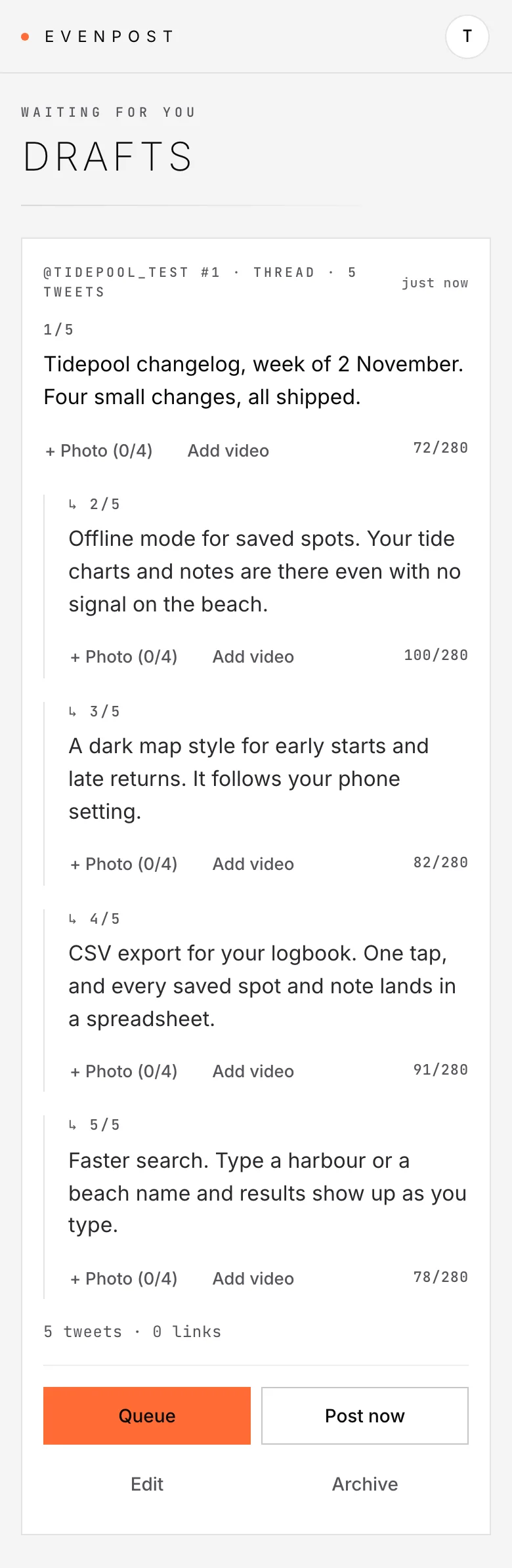
A changelog thread drafted by an agent and waiting for approval, in the Evenpost app on a test account, 10 November 2026:
A shipping update that names what a user can do now, then points to the changelog:
This week we shipped several highly requested editor improvements to Linear including the ability to resize images. Drag them to the width you want from the sides. Resizing images next to each other will enable snapping them to the same size.
We also added support for:
- Alt+Arrow Up/Down to reorder list items, selected text and images
- Shift+Enter to add linebreaks in a paragraphLearn more and see other updates in this week's changelog: https://t.co/2F5aWrjYqc
Linear (@linear), September 28, 2023. View on X. Checked 2026-11-10.
A hook that lists concrete CLI results and opens a thread:
🚢🚨🚢Shipping Alarm 🚨🚢🚨
We just shipped a major update to the CLI to automate:
⬥ uploading files to Storage
⬥ setting up & seeding Branches
⬥ configuring Edge Functions
⬥ managing Auth redirects in Preview Enviroments🧵 https://t.co/VtTl1A1npo
Supabase (@supabase), December 4, 2024. View on X. Checked 2026-11-10.
How do you and your agent draft the thread and get it onto X?
You and your agent make the thread together from the changelog, you approve every post in the Evenpost app, and the thread is posted one tweet at a time, in order. The agent can read the file, propose a hook, split the changes, and tighten the wording; approving, queueing, and posting are yours, in the Evenpost app today.
The writing steps above still belong to you. You decide whether the thread sounds like you and whether every claim is in the changelog.
A draft can be a single post or a thread. When it is a thread, it goes out one tweet at a time, in order. From an agent that speaks MCP, the tools you want are create_draft, then update_draft if you change the wording, then request_approval. On the CLI, the draft command is:
evenpost draft create "first tweet" "second tweet"The same command, with its npx prefix, is on How to schedule X posts from the terminal.
Evenpost is an app for X (Twitter) for solo founders. Your agent drafts from your work, you approve every post in the Evenpost app, and Evenpost posts with even spacing. Updates: @evenpost.
The CLI has no approval-request command today; from MCP the tool is request_approval. request_approval only notifies you. It does not approve, queue, or post; it sends you a notification. You approve the exact thread in the Evenpost app. After you approve, it is posted with natural spacing.
If you work in Claude Code, the free /evenpost skill follows this path when you say /evenpost this. The MCP prompt evenpost ("Evenpost this") can take format post, thread, or auto. Setup starts at Install Evenpost.
If what you have is a git diff rather than a written changelog, How to turn a git diff into a build-in-public post is the shorter path for that raw material. If you already work in Claude Code and want the client-specific thread path, see How to post an X thread from Claude Code.
The product does not curate ideas for you. It starts from work you already did, and you stay in the loop on the words.
What should you leave out of a changelog thread?
Leave out the ticket dump, the internal jargon, and any claim the changelog does not support. That means ticket IDs and commit hashes, internal service names with no user-facing result, typo and dependency lines, metrics you wish were true, and a paste of the file or a hook that is only a version number and a link.
Skip these, even if they are in the file:
- Ticket IDs, issue numbers, and commit hashes. They help a teammate. They mean nothing on a timeline.
- Internal names for services, flags, and refactors that have no user-facing result. "Rebuilt the sync worker" is only useful if you also say what the user no longer sees go wrong.
- Every typo, chore, and dependency bump. Group them or drop them. A thread is not a complete archive of the release.
- Metrics you wish were true. If the changelog does not have a number, leave the hook without one.
- A paste of the file, or a hook that is only a version number and a link. The first tweet has to stand on its own.
The durable habit is simple: ship the work, translate the list, and put a human in the loop before anything hits the timeline. You and your agent make the thread together, and you approve every post today.
FAQ
Can I paste a changelog into a thread as-is?
No. A changelog is written for people who already use the product and want the list. A thread is written for people scrolling a timeline who do not owe you their attention. Keep the facts, drop the ticket IDs, and rewrite each change as a result someone can picture. The hook has to make sense without the file.
How many tweets should a changelog thread have?
As many as you have real, user-facing changes worth a sentence, and no more. Give each of those changes its own tweet, group tiny fixes, and skip typo-level lines. A short, specific thread is stronger than a long one padded to look like a launch. There is no required count.
Can my agent approve or post the thread for me?
Today your agent drafts and asks; you approve. It can write the thread and ask you to look, and request_approval only notifies you. You review the exact tweets and approve them in the Evenpost app. After you approve, the thread is posted one tweet at a time, in order.
What if I have a git diff instead of a changelog?
Use the diff. That is also work you already did, and it can be raw material for a post or a thread. See How to turn a git diff into a build-in-public post for that path. The shaping rules in this guide still apply: a hook, one change per tweet, and a close.
How do I turn a changelog into a thread from Claude Code?
You and your agent draft the thread in Claude Code from the changelog in front of you, then you approve it in the app. The free /evenpost this skill and How to post an X thread from Claude Code cover that path.
Updated 11 Nov 2026 · By Evenpost